No products in the cart.

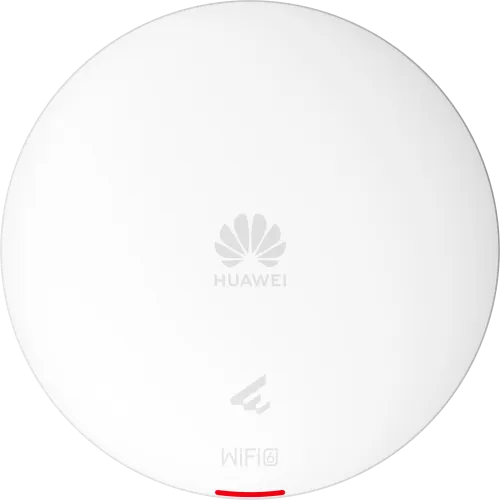
Huawei eKitEngine AP362: The Wi-Fi 6 Access Point That Handles Real-World Wireless Demands
There’s a moment every network engineer recognizes — the one where your existing wireless infrastructure simply can’t keep up anymore. Users are complaining about lag during video calls, the conference room drops connection right before a client presentation, and your access points are choking under the weight of 40 simultaneous devices. If that scenario sounds familiar, the Huawei eKitEngine AP362 Dual-Band Wi-Fi 6 Wireless Access Point is exactly the kind of upgrade your network has been waiting for.
Huawei’s eKitEngine series is specifically engineered for small-to-medium enterprise environments — and the AP362 sits right at the sweet spot of that lineup. It’s a ceiling-mount, dual-band Wi-Fi 6 (802.11ax) access point delivering up to 574 Mbps on the 2.4 GHz band and up to 2,402 Mbps on the 5 GHz band, for an aggregate throughput of 2.976 Gbps. That’s a substantial leap from anything Wi-Fi 5 can offer, and you feel the difference the moment high-density usage kicks in.
What makes Wi-Fi 6 genuinely better isn’t just raw speed — it’s the underlying technology. OFDMA allows the AP362 to serve multiple clients simultaneously within a single transmission window, while MU-MIMO (2×2) ensures spatial efficiency in environments with many connected devices. The result is lower latency, more stable connections, and a noticeably smoother experience for everyone on the network — whether they’re on a laptop, a mobile phone, or a wireless IP camera.
The AP362 integrates seamlessly with Huawei’s iMaster NCE cloud management platform, giving IT teams centralized control over the entire wireless network — configuration, monitoring, firmware updates, and troubleshooting — from a single dashboard. For businesses operating multiple branches across Bangladesh, from Dhaka to Sylhet to Khulna, this kind of remote visibility is not a luxury. It’s a practical necessity.
Built for real deployment environments, the AP362 supports up to 1024 associated users and up to 512 connected clients per AP — making it a reliable choice for dense office floors, university lecture halls, hospital waiting areas, hotel lobbies, and retail environments where dozens or hundreds of devices connect at once.
Huawei eKitEngine AP362 Specifications
| Specification | Details |
|---|---|
| Model | Huawei eKitEngine AP362 |
| Wi-Fi Standard | IEEE 802.11ax (Wi-Fi 6) |
| Frequency Bands | Dual-Band: 2.4 GHz + 5 GHz |
| 2.4 GHz Max Speed | 574 Mbps (802.11ax) |
| 5 GHz Max Speed | 2,402 Mbps (802.11ax) |
| Aggregate Throughput | Up to 2.976 Gbps |
| Spatial Streams | 2×2 MU-MIMO |
| Key Technologies | OFDMA, MU-MIMO, BSS Coloring, TWT |
| Max Associated Users | 1,024 per AP |
| Max Connected Clients | 512 per AP |
| Ethernet Ports | 1 × 10/100/1000 Mbps (PoE In) |
| PoE Input | IEEE 802.3at (PoE+), max 22.4W |
| USB Port | 1 × USB 2.0 |
| Antenna Type | Built-in Omnidirectional |
| Antenna Gain (2.4 GHz) | 3 dBi |
| Antenna Gain (5 GHz) | 4 dBi |
| Management Platform | Huawei iMaster NCE / eKit App / Web GUI |
| Security Protocols | WPA, WPA2, WPA3, 802.1X |
| Mounting Style | Ceiling Mount (bracket included) |
| Dimensions | 180 × 180 × 35.4 mm |
| Weight | Approx. 370g |
| Operating Temperature | 0°C to 45°C |
| Operating Humidity | 5% – 95% RH (Non-condensing) |
| Ingress Protection | IP51 |
| Warranty | Limited Hardware Warranty |
Why Buy the Huawei eKitEngine AP362 Access Point?
- Solves the high-density connection problem that kills productivity. In offices, classrooms, or hotels across Bangladesh where 30, 50, or even 100+ devices connect to a single access point, older Wi-Fi 5 hardware visibly struggles — buffering, dropped connections, and inconsistent speeds become the norm. The AP362’s OFDMA and MU-MIMO technology fundamentally changes how it handles concurrent connections, serving multiple clients in parallel rather than queuing them sequentially. The result is measurably faster, more stable Wi-Fi for every user on the network, even during peak hours.
- Cloud-managed simplicity that saves IT teams hours every week. Setting up and maintaining a multi-AP wireless network manually is time-consuming and error-prone. The AP362 connects directly to Huawei’s iMaster NCE cloud platform, enabling zero-touch provisioning, auto-configuration, and centralized policy management across all access points from a single interface. Whether you’re deploying five APs in a Gulshan office or fifty across a hospital campus in Chattogram, the management overhead stays manageable — and your team stays sane.
- Wi-Fi 6 investment that remains relevant for years to come. Businesses in Bangladesh are rapidly adopting bandwidth-heavy tools — cloud applications, video conferencing, IP surveillance, and IoT devices are all growing simultaneously. The AP362 is built for that trajectory. With WPA3 security, Target Wake Time (TWT) for IoT efficiency, BSS Coloring for interference reduction, and full Wi-Fi 6 certification, it’s a piece of infrastructure that won’t need replacing when your network demands double next year.
FAQ
Q1: What is the price of the Huawei eKitEngine AP362 in Bangladesh?
The Huawei eKitEngine AP362 Dual-Band Wi-Fi 6 Wireless Access Point price in Bangladesh depends on the authorized distributor, so contact leading IT hardware retailers in Dhaka or Huawei’s certified partners for the current BDT pricing and stock availability.
Q2: Does the Huawei eKitEngine AP362 require a separate power adapter?
No — the AP362 supports IEEE 802.3at PoE+ input through its single Ethernet port, meaning it draws power directly from a PoE-capable switch or PoE injector, eliminating the need for a separate power adapter and significantly simplifying ceiling-mount installation in offices and public spaces.
Q3: Can the Huawei eKitEngine AP362 work without the Huawei cloud platform?
Yes — while the iMaster NCE cloud platform and the Huawei eKit App provide the most streamlined and feature-rich management experience, the AP362 also supports standalone local management through a standard web-based GUI, making it fully usable in environments where cloud connectivity is restricted or unavailable.

Related products
Sale!
Hikvision DS-1LN6U-ZCO CAT6 305 Meter UTP Cable
Original price was: 16,500.00৳ .13,500.00৳ Current price is: 13,500.00৳ .
Sale!

Ubiquiti UAP-AC-LR AC1300 1300 Mbps Dual-Band Gigabit UniFi Access Point
Original price was: 17,500.00৳ .15,500.00৳ Current price is: 15,500.00৳ .Sale!
Tp-Link EAP610-Outdoor AX1800 Indoor Outdoor WiFi 6 Access Point
Original price was: 15,500.00৳ .13,200.00৳ Current price is: 13,200.00৳ .Sale!

Hikvision DS-D5022F2-2P2/CBD 21.5″ 100Hz Full HD IPS Monitor
Original price was: 15,500.00৳ .12,900.00৳ Current price is: 12,900.00৳ .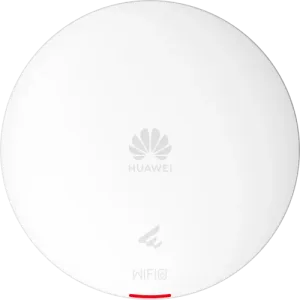 Huawei eKitEngine AP362 Dual-B...
 Original price was: 24,900.00৳ .23,000.00৳ Current price is: 23,000.00৳ .
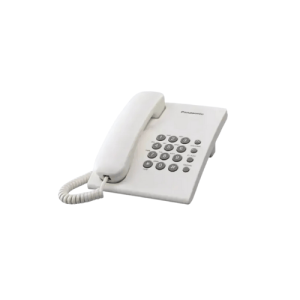
Panasonic Phone Set KX-TS500MX (Original)
Original price was: 2,050.00৳ .1,650.00৳ Current price is: 1,650.00৳ .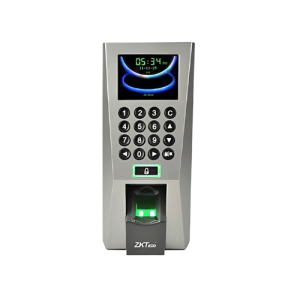
ZKTeco F18 Access Control
Original price was: 12,500.00৳ .10,300.00৳ Current price is: 10,300.00৳ .
Toten 6U Server Rack 600 x 450mm
Original price was: 13,500.00৳ .12,300.00৳ Current price is: 12,300.00৳ .
Categories
Categories